Apps › POS
KwickPhone Apps · Point of Sale · Register + Inventory

The register that answers its own phone.

No POS? KwickPhone is your POS — a full register with menus, modifiers, tabs, tables, retail, and inventory. And unlike every other register on earth, the phone orders walk in by themselves: the AI takes the call and the order lands in your queue, sized, modified, and paid.
Start free — first month on us Read the manual ↓
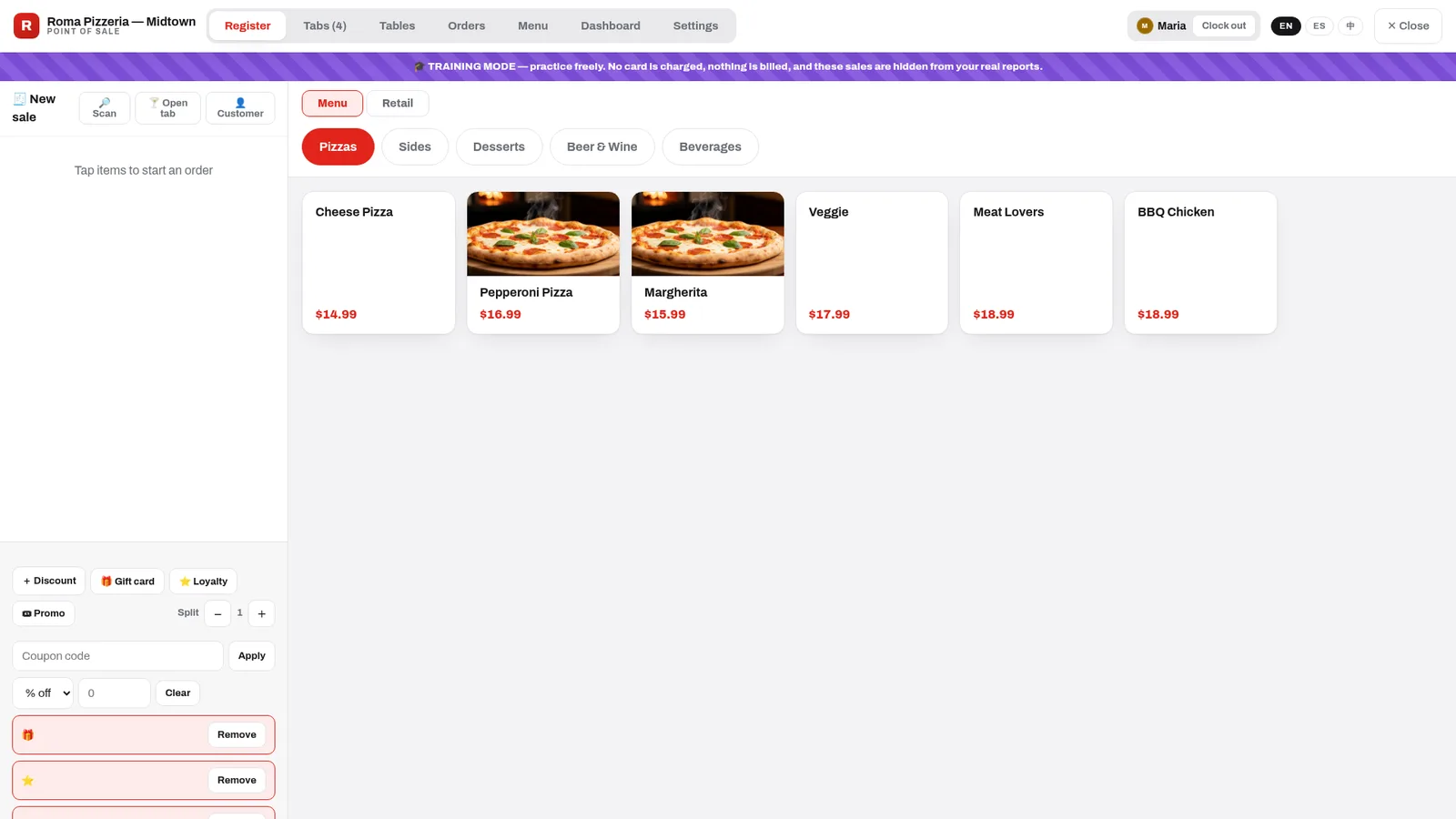
KwickPhone POS register: photo tiles for pizzas beside clean text tiles, category pills, open tabs counter, clocked-in operator chip, and the purple training-mode banner

The real register — a pizzeria seeded from the starter library, two items photographed, Maria clocked in, four tabs open. The purple band is training mode: practice freely, nothing is billed, nothing touches your reports.

Screenshots regenerate from the live console — this product ships improvements weekly.

The story owners tell us

Friday, 6:48 PM, phone ringing off the hook

The counter line is six deep. The phone rings — nobody moves, because the AI has it: a large pepperoni, extra cheese, pickup in twenty, paid by the card on file. It appears in the Orders tab between two walk-ins.

At the register, a photo tile, two taps for size and toppings, card, done — next guest. Table 4 asks to keep the tab open for another round; it's already on their card.

Saturday morning the owner checks the dashboard over coffee: last night's sales by hour, top items, tips split. The phone took 23 orders. It never asked for a break.
The manual · Daily workflows

How your team actually runs it

1

Ring a sale in three taps

Tap the tile (photos sell — add them with the 📷 on any item), pick the size, add modifiers — required groups ask automatically, so a pizza never leaves without a crust choice. Cash or card, tip prompt if you want one, print or text the receipt.

The Retail toggle switches the grid to stock-tracked products: tap, search, or scan a barcode. Serialized items — phones, tools — prompt for the serial at checkout. Every retail sale depletes stock and records cost, so margins are real.

Register tiles: pizza photo tiles beside text tiles with prices, Menu and Retail source toggle
2

Tabs for the bar, tables for the floor

Open Tabs hold a party's rounds over time — with an optional card attached at open, so "keep it open" is safe and closing time is one tap. The register shows how many are running; auto-save means a dropped connection never loses a round.

The Tables view is your floor, drawn your way: drag tables into rooms and sections, rotate them to match reality, and read the room at a glance — who's seated, who's paying, what's free.

POS Tables view: drag-and-drop floor map with table states across sections
3

A menu the AI can sell

Build it three ways: pick a starter from the library — 11 restaurant types, pizzeria to full bar, complete with typical prices and the right modifier groups — let the AI import your menu from your ordering site into a reviewable draft, or build by hand with CSV up/down.

Whatever you approve is exactly what the AI offers on the phone — sizes, toppings, and all. It can never sell a dish you don't have.

Menu builder: categories, items with photo slots, variations and modifier groups

🎓 Training mode: break nothing, learn everything

Every new location starts in a striped-banner sandbox: practice sales are hidden from real reports, no card is ever charged, and the go-live checklist tells you when you're ready. Flip to live in one tap — and the sandbox stays forever, so every new hire trains on the real register with fake money. Production data and practice data never mix.

No card chargedHidden from reportsGo-live checklistStays for new hires
Beyond the counter

Inventory that would cost $200/month elsewhere

The Inventory console rides along free: vendors and purchase orders with receiving that updates costs, review-gated stock counts (a bulk CSV import creates a count to approve — never a blind overwrite), transfers between locations with cost carried and SKUs bridged, moving-average COGS and margin on every sale, and a reorder worklist that tells you what's running low. Serial tracking covers the full lifecycle — in stock, sold, returned, repaired.

Multi-location group? Transfers and roll-ups are part of the enterprise rails every account runs on.

What the AI does on a call

The phone is a register lane now

"Large pepperoni, extra cheese, pickup." → The AI walks the menu exactly as you approved it — sizes, required modifier groups, real prices — reads the order back, and drops it into your Orders tab. No callback. No re-keying.

"Can I pay now?" → Card on file, charged PCI-compliantly — or a pay link texted to their phone. No one ever reads a card number aloud.

"Wait, what did I get last time?" → It knows. "Your usual — Kung Pao Chicken and an egg roll?" Repeat customers get repeat-order magic, in English, Spanish, or Chinese.
Self-service — free with the POS

A kiosk lane on any tablet. $0/month.

Competitors charge $30–60 a month per kiosk. Ours is included: put any tablet in a stand, scan a QR code from your console, and guests order themselves — big photo tiles, English, Spanish or Chinese, on the same approved menu your register and phone AI sell from. The kiosk shouts a pickup number ("Order 47!"), your cashier taps Recall # at the register, and takes payment. Same orders feed, same loyalty points, no re-keying — and Training Mode covers the kiosk too, so staff can practice before it faces guests.

Kiosk attract screen with the store's own branding and Tap to order
Your brand, full screen — guests tap to start.
Kiosk ordering screen with photo tiles and EN/ES/中 language toggle
Big tiles, your approved menu, EN·ES·中 toggle.

Free POS. Real inventory. A free kiosk lane. A phone that sells.

Included on every plan — even the $0 one. If you have a POS you love, keep it: we integrate. If you don't, stop paying for one.

Start free See pricing

Questions owners ask

Can the AI really put phone orders into my register?

Yes — that's the whole point. Orders arrive in your queue sized, modified, and optionally paid, exactly like a walk-in sale. No callback, no re-keying.

What is training mode exactly?

A sandbox that's on by default for new locations: banner across the screen, practice sales hidden from real reports, no card ever charged. Go live when the checklist is green; the sandbox stays for onboarding staff.

Do bar tabs support cards on file?

Yes — attach a card when the tab opens; rounds accumulate; settle in one tap at close.

How do stock counts avoid disasters?

Counts are review-gated: whatever you count (or bulk-import by CSV) becomes a pending count a manager approves — the system never silently overwrites your on-hand numbers.

Can I run retail and food in one register?

Yes — one cart takes both: menu items with modifiers and stock-tracked retail with barcodes and serials, in the same sale.

Which languages?

The console and the AI both work in English, Spanish, and Chinese.